> ## Documentation Index
> Fetch the complete documentation index at: https://docs.belio.co.ke/llms.txt
> Use this file to discover all available pages before exploring further.
# Introduction
This API enables you to send messages to recipients efficiently while allowing
management and monitoring of message delivery through callbacks.
## Prerequisites
Before you begin, ensure you have:
* A valid and active sms service - You can get one by visiting the [Services](https://cloud.belio.co.ke/services) page
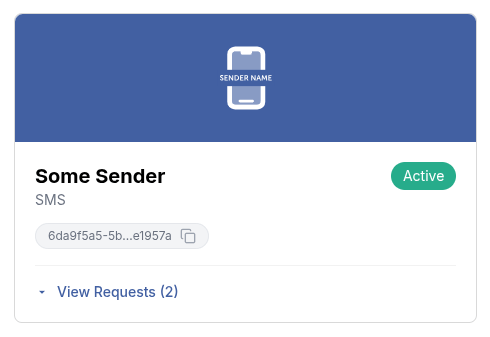
* There are two ways to get a service ID:
1. Use the [List Services](/service/list) endpoint to list all services and retrieve the ID of the specific one you intend to use
2. Go to the [Services](https://cloud.belio.co.ke/services) page and copy the ID by clicking on the copy file icon as shown in
the image below.
 * API client authorization - This endpoint requires the `message.sms.send.oneway` API client authorization scope to send one way
sms messages. You can set up scopes on the [API Clients](https://cloud.belio.co.ke/team-overview/api-access-keys) page.
## Sender Types
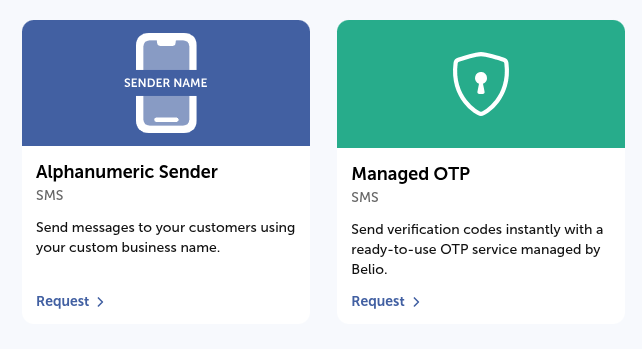
SMS messages are sent using one of two sender types:
* **Alphanumeric Sender** is a custom, branded sender name you request for your team. Once approved, it's yours to use freely for any message content.
* **Belio-managed sender** is a ready-to-use sender owned and operated by Belio (e.g. Managed OTP), intended for a specific purpose such as authentication. Because Belio owns and is responsible for these senders, their use is restricted to that purpose, and messages sent through them require additional approval. See [Templates](/messaging/sms/templates/introduction) for how this applies to template-based sends.
You can request either sender type from the [Services](https://cloud.belio.co.ke/services/services-menu) page.
* API client authorization - This endpoint requires the `message.sms.send.oneway` API client authorization scope to send one way
sms messages. You can set up scopes on the [API Clients](https://cloud.belio.co.ke/team-overview/api-access-keys) page.
## Sender Types
SMS messages are sent using one of two sender types:
* **Alphanumeric Sender** is a custom, branded sender name you request for your team. Once approved, it's yours to use freely for any message content.
* **Belio-managed sender** is a ready-to-use sender owned and operated by Belio (e.g. Managed OTP), intended for a specific purpose such as authentication. Because Belio owns and is responsible for these senders, their use is restricted to that purpose, and messages sent through them require additional approval. See [Templates](/messaging/sms/templates/introduction) for how this applies to template-based sends.
You can request either sender type from the [Services](https://cloud.belio.co.ke/services/services-menu) page.
 ## Advanced Features
For enhanced functionality, you can include an optional `receiptRequest` in
the request body. This feature allows you to receive delivery receipts for the messages
you send, enabling you to track their status and confirm a successful delivery. The
`receiptRequest` object includes the following fields:
* **correlator**: A unique string to correlate the delivery receipt with the original message.
* **callbackUrl**: A URL where the delivery receipt will be sent.
```bash theme={null}
curl --request POST \
--url https://api.belio.co.ke/message/{serviceId} \
--header 'Authorization: Bearer ' \
--header 'Content-Type: application/json' \
--data '{
...
"receiptRequest": {
"correlator": "",
"callbackUrl": ""
}
}'
```
By leveraging these features, you can ensure reliable message delivery and gain valuable
insights into the status of your communications.
## Advanced Features
For enhanced functionality, you can include an optional `receiptRequest` in
the request body. This feature allows you to receive delivery receipts for the messages
you send, enabling you to track their status and confirm a successful delivery. The
`receiptRequest` object includes the following fields:
* **correlator**: A unique string to correlate the delivery receipt with the original message.
* **callbackUrl**: A URL where the delivery receipt will be sent.
```bash theme={null}
curl --request POST \
--url https://api.belio.co.ke/message/{serviceId} \
--header 'Authorization: Bearer ' \
--header 'Content-Type: application/json' \
--data '{
...
"receiptRequest": {
"correlator": "",
"callbackUrl": ""
}
}'
```
By leveraging these features, you can ensure reliable message delivery and gain valuable
insights into the status of your communications.